GTA V Ultra-Realistic Graphics 2026 (Step-by-Step Overhaul Guide)

U1D Team
February 15, 2026 · 6 min read
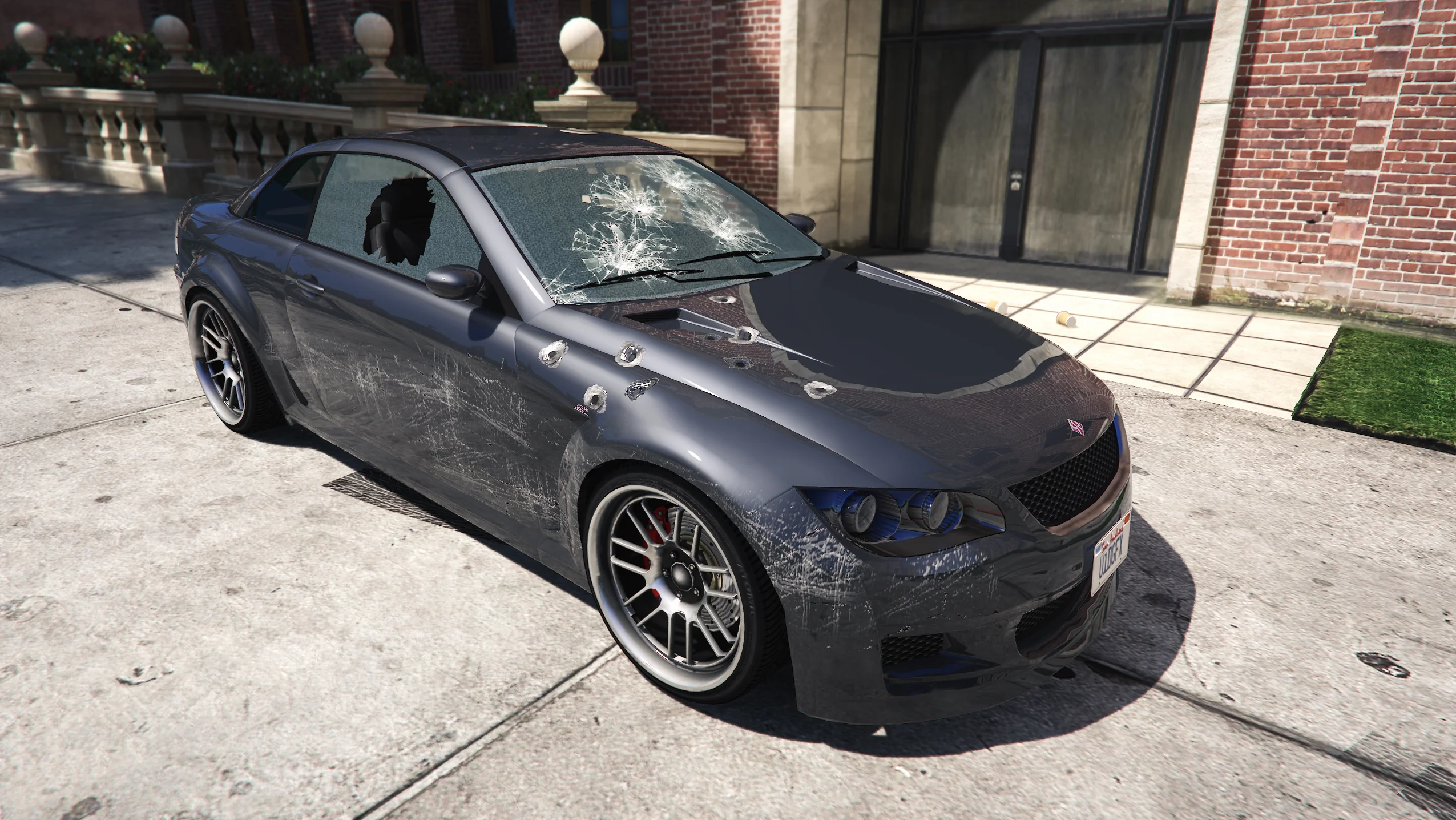
GTA V may be over a decade old, but in 2026 it can still look better than many modern titles — if you set it up correctly.
If you’ve seen ultra-realistic FiveM or GTA V gameplay on YouTube or TikTok and wondered how creators achieve that cinematic look, this guide breaks it down step by step.
We’ll cover:
- The best in-game settings
- Why most graphics mods fail
- How shader systems actually work
- Before vs after expectations
- How U1D GFX’s Remastered pack transforms visuals
- How to get started (including a free starter pack concept)
This is a complete graphics overhaul walkthrough.
Step 1: Optimize Your Base Game Settings
Before installing any shaders or graphic packs, you need a stable performance foundation.
Disable These First
These settings hurt FPS the most:
- MSAA (turn off)
- Reflection MSAA (off)
- Extended Distance Scaling (low or off)
- Extended Shadows Distance (low)
- Advanced Graphics settings (mostly disabled)
- Grass Quality (Normal or Low for FiveM)
Keep These Moderate to High
These settings improve visuals without massive performance cost:
- Texture Quality (High if you have enough VRAM)
- Shader Quality (High recommended)
- Post FX (High for better lighting tone)
- Anisotropic Filtering (8x or 16x)
After adjusting, test your FPS in downtown Los Santos. Your goal is stable frame pacing before adding visual enhancements.
Step 2: Understand Why Most “Realistic Mods” Look Bad
Many free presets:
- Overexpose sunlight
- Add excessive bloom
- Crush shadows at night
- Reduce visibility during gameplay
- Cause FPS instability
They are built for screenshots — not real gameplay.
Realism is not about making everything brighter or darker. It’s about:
- Balanced lighting
- Natural color grading
- Controlled contrast
- Weather consistency
- Environmental detail
This is where professional shader systems make the difference.
Step 3: Install a Structured Graphics System
To make GTA V look ultra-realistic in 2026, you need more than a simple reshade preset.
You need a full visual enhancement framework.
Introducing U1D GFX
Welcome to U1D GFX, creators of advanced FiveM shaders and graphics for multiple games.
U1D has been developing FiveM graphics for over a year, driven by a passion to deliver immersive visuals that elevate gameplay without sacrificing performance.
You can view their work across:
- YouTube
- TikTok
- Their official website
- Patreon
If you’ve watched cinematic FiveM content recently, you’ve likely already seen their work.
The Main Product: Remastered by U1D GFX
The primary product is Remastered, a monthly updated graphics pack designed to enhance realism across GTA V and FiveM.
Remastered includes:
- Custom shaders
- Custom visual addons
- Lighting overhauls
- Weather cycle enhancements
- Cloud improvements
- Environmental refinements
- Optional modification add-ons
It is not a static preset. It evolves monthly.
What Remastered Actually Changes
1. Weather Overhaul
Remastered enhances every weather cycle:
- Clear daylight
- Sunset tones
- Night clarity
- Rain reflections
- Storm density
- Fog depth
Each condition feels distinct and cinematic without breaking visibility.
2. Cloud Improvements
Default GTA clouds lack depth.
Remastered improves:
- Cloud layering
- Sky contrast
- Atmospheric blending
- Horizon realism
This alone dramatically increases perceived realism in gameplay videos.
3. Road & Environment Overhauls
One of the most popular optional addons is the road overhaul.
This enhances:
- Road texture realism
- Surface reflections during rain
- Light interaction with pavement
- Overall ground sharpness
Small environmental refinements create major visual impact.
4. Lighting & Effects
Remastered includes overhauls to:
- Original game lighting
- Highlight balance
- Shadow depth
- Interior brightness
- Street lighting tone
Optional addon modifications include:
- White street lights overhaul
- Realistic weapon muzzle flash and smoke
- Additional environmental refinements
Instead of artificial brightness, the system balances exposure for natural realism.
Before vs After: What to Expect
Before
- Flat daylight
- Washed-out colors
- Dull road textures
- Basic cloud rendering
- Weak night visibility
After (With Remastered)
- Cinematic sun warmth
- Balanced shadows and highlights
- Realistic cloud depth
- Improved environmental clarity
- Sharper road reflections
- Modernized lighting tone
The difference is noticeable immediately — especially during sunset and rain cycles.
Step 4: Choose Your Version
Remastered is available via Patreon.
$10 — Base Remastered
- Core graphics enhancements
- No optional addon modifications
- Clean and optimized visual upgrade
$16 — Remastered Full
- Base graphics
- All optional addon modifications
- Full Remastered experience
- Complete overhaul package
When you subscribe, you gain access to the previous year of Remastered releases as well.
To continue receiving updates, an active subscription is required.
One-Time Purchase Options
If you prefer not to subscribe monthly, U1D GFX also offers:
- Collections 1–6
- A complete bundle option for a discounted rate
These are one-time purchases available through Patreon.
Free GTA V Realism Graphics Starter Pack (Concept)
If you're new to graphics overhauls, a starter pack approach works best.
A Free GTA V Realism Graphics Starter Pack by U1D GFX could include:
- Optimized base shader preset
- Recommended in-game settings file
- Installation guide
- Comparison screenshots
- Upgrade path to Remastered Full
This allows players to experience the visual difference before committing to the full package.
Why This Method Works in 2026
Ultra-realistic GTA V visuals are no longer about extreme filters.
They are about:
- Structured shader systems
- Consistent updates
- Balanced weather refinement
- Professional lighting control
- Environmental detail enhancement
Remastered by U1D GFX focuses on evolving realism rather than one-time presets.
That’s why creators continue to use it for cinematic gameplay, FiveM roleplay, and high-quality content production.
Final Thoughts
If you want GTA V to look ultra-realistic in 2026:
- Optimize your base settings.
- Avoid heavy, unstable presets.
- Use a structured graphics system.
- Choose professional, actively updated solutions.
The difference between average gameplay and cinematic realism is not your GPU — it’s the graphics system you use.
And that’s exactly what U1D GFX was built to provide.