How to Take Cinematic Screenshots in FiveM

U1D Team
April 29, 2026 · 5 min read
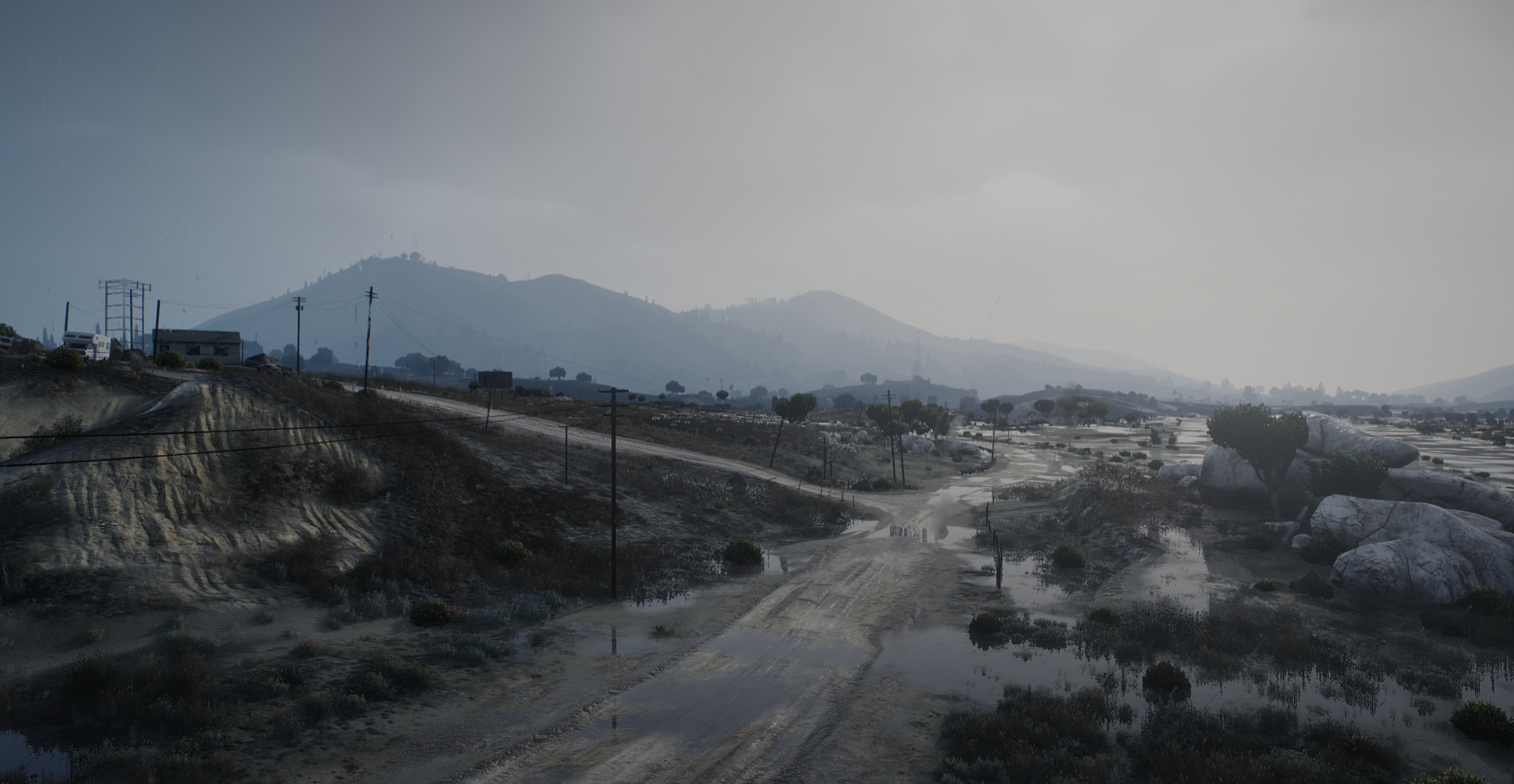
Why U1D GFX Is Ideal for Cinematic Screenshots
Unlike basic graphics mods or reshade presets, U1D GFX improves the core visual systems of the game. This means:
- More natural lighting without overexposure
- Better contrast between light and shadow
- Realistic weather and sky rendering
- Cleaner reflections and environmental detail
These improvements create a strong foundation for cinematic shots without needing excessive editing.
Step 1: Set Up Your Graphics for Cinematics
Before taking screenshots, you need to configure your game for visual quality.
Recommended In-Game Settings
- Texture Quality: High or Very High
- Shader Quality: High
- Shadow Quality: High
- Reflection Quality: Medium or High
- Post FX: High
Avoid maxing everything if it causes instability. Smooth performance helps with timing and camera control.
Choose the Right U1D GFX Version
- Base Remastered: Better for performance and stable shots
- Full Remastered: Best for cinematic visuals with full addons
For screenshots, the full version is recommended if your system can handle it.
Step 2: Use the Right Time of Day
Lighting is the most important factor in cinematic screenshots.
Best Times for Cinematics
#### Golden Hour (Sunrise/Sunset)
- Warm lighting
- Long shadows
- Natural color contrast
#### Night
- Strong artificial lighting
- Street lights and reflections stand out
- Ideal for urban scenes
#### Overcast Weather
- Soft lighting
- Reduced harsh shadows
- Great for realistic tones
U1D GFX enhances all of these conditions, making each time of day visually unique.
Step 3: Control the Camera
To achieve cinematic shots, you need more control than the default camera.
Use Freecam Tools
Freecam allows you to:
- Adjust angles precisely
- Control depth and framing
- Capture dynamic perspectives
Look for tools commonly used in FiveM servers that allow camera movement and positioning.
Composition Techniques
#### Rule of Thirds
Place your subject slightly off-center to create balance.
#### Leading Lines
Use roads, buildings, or light sources to guide the viewer’s eye.
#### Depth
Include foreground, midground, and background elements to add dimension.
Step 4: Use U1D GFX Lighting to Your Advantage
u1dgfx’s lighting system is one of its strongest features for cinematics.
Position Your Subject Around Light Sources
- Street lights for dramatic night shots
- Sunlight for natural highlights
- Reflections for added realism
Avoid placing your subject in flat lighting. Contrast creates visual interest.
Work With Shadows
Shadows add depth and realism:
- Use long shadows during sunset
- Capture silhouettes during sunrise
- Avoid overly dark areas where detail is lost
U1D GFX balances shadows well, making them usable instead of overwhelming.
Step 5: Weather Selection for Mood
Weather plays a major role in storytelling.
Clear Weather
- Clean, vibrant visuals
- Best for showcase shots
Rain
- Reflective surfaces
- Dramatic lighting effects
Fog
- Atmospheric depth
- Mystery and cinematic tension
U1D GFX improves all weather types, making them more visually impactful without excessive performance cost.
Step 6: Capture in High Resolution
For the best results:
- Use higher resolution settings if possible
- Take multiple shots from different angles
- Avoid motion blur unless intentionally used
Higher resolution images allow for better editing and sharper final results.
Step 7: Post-Processing (Optional)
Even though U1D GFX already enhances visuals, light editing can improve screenshots further.
Basic Edits
- Adjust brightness and contrast
- Slight color correction
- Sharpen details
Avoid over-editing. The goal is to enhance, not distort.
Step 8: Use Addons for Extra Detail
If you are using U1D GFX Full, take advantage of addons:
- Road overhaul for better surface detail
- White street lights for cleaner night shots
- Muzzle flash effects for action scenes
These small details can significantly improve the final image.
Pricing Breakdown
U1D GFX Remastered is available in three tiers.
$10 — Base Remastered
- Core graphics only
- Good for stable performance
$16 — Remastered Full
- Includes all addons
- Best for cinematic screenshots
$20 — Early Access
- Full experience plus early updates
Additional Benefits
- Access to previous releases
- Continuous updates with subscription
Common Mistakes to Avoid
- Overexposing shots with too much brightness
- Using poor angles or default camera views
- Ignoring background composition
- Overusing filters or reshade effects
- Capturing during flat lighting conditions
Avoiding these mistakes can dramatically improve your results.
How U1D GFX Elevates Cinematics
The biggest advantage of U1D GFX is how it changes the feel of every shot.
- Lighting looks natural instead of artificial
- Weather adds atmosphere instead of distraction
- Environments feel detailed and alive
This allows you to capture cinematic images directly in-game without heavy editing.
Taking cinematic screenshots in FiveM is a combination of good tools, proper timing, and visual awareness. U1D GFX Remastered provides the foundation needed to create high-quality images with minimal effort.
By understanding lighting, composition, and environment, you can turn simple scenes into cinematic moments that stand out.